| |
Apple
Before the World Wide Web did anything, HyperCard did everything.
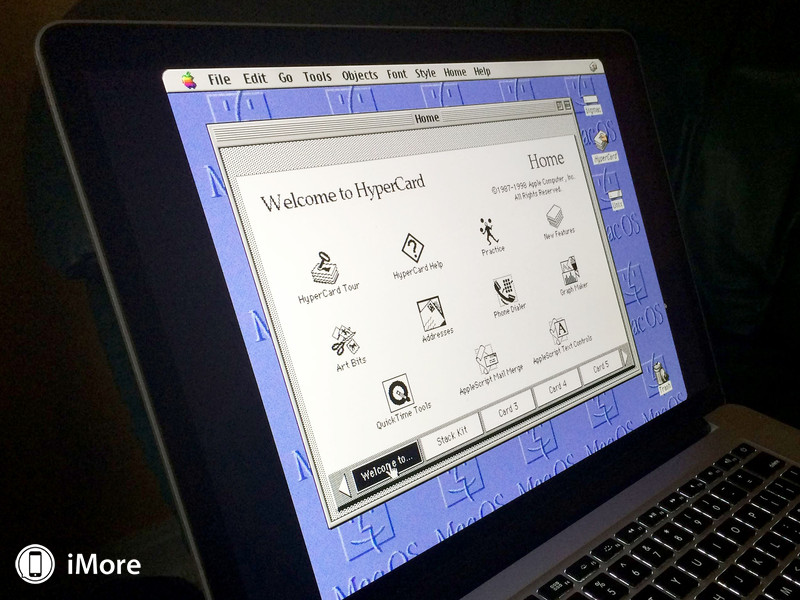
Apple
From Wikipedia, the free encyclopedia
HyperCard was an application program for Apple Computer, Inc. that was among the first successful hypermedia/multimedia systems before the World Wide Web. It combines database capabilities with a graphical, flexible, user-modifiable interface.[1] HyperCard also features HyperTalk, a programming language for manipulating data and the user interface.
This combination of features - simple form layout, database capabilities and ease of programming - led to widespread use in many different roles. Some HyperCard users employed it as a programming system for Rapid Application Development of applications and databases, others for building interactive applications with no database requirements, command and control systems, and many examples in the demoscene.
Design
HyperCard is based on the concept of a "stack" of virtual "cards".[3] Cards hold data, just as they would in a rolodex. Each card contains a number of interactive objects, including text fields, check boxes, buttons, and similar common GUI elements. Users "browse" the stack by navigating from card to card, using built in navigation features, a powerful search mechanism, or through user-created scripts.[4]
Users build new stacks or modify existing ones by adding new cards. They place GUI objects on the cards using an interactive layout engine based on a simple drag-and-drop interface.[4] Additionally, HyperCard also included prototype or template cards known as "backgrounds"; when new cards are created they can refer to one of these background cards, which causes all of the objects on the background to be copied onto the new card. This way a stack of cards with a common layout and functionality can be created. The layout engine was similar in concept to a "form" as used in most rapid application development (RAD) environments (such as Borland Delphi or Visual Basic).
The database features of the HyperCard system are based on the storage of the state of all of the objects on the cards in the physical file representing the stack. The database did not exist as a separate system within the HyperCard stack, that is, there was no database engine or similar construct. Instead, the state of any object in the system was considered to be live and editable at any time; from the HyperCard runtime's perspective, there was no difference between moving a text field on the card and typing into it, both operations simply changed the state of the target object within the stack. Such changes are immediately saved when complete, so typing into a field caused that text to be stored to the stack's physical file. The system operates in a largely stateless fashion, with no need to "save" during operation. This is in common with many database-oriented systems, although somewhat different than document-based applications.
The final key element in HyperCard was the "script", a single code-carrying element of every object within the stack. The script was a text field whose contents were interpreted in the HyperTalk language (detailed below).[4] Like any other property, the script of any object could be edited at any time and changes were saved as soon as they were complete. When the user invokes actions in the GUI, like clicking on a button or typing into a field, these actions are translated into "events" by the HyperCard runtime. The runtime then examines the script of the object that was the target of the event, like a button, to see if its script object contains code for that event, code known as a "handler". If it does, the HyperTalk engine runs the handler, if it does not, the runtime examines other objects in the visual hierarchy.
These concepts make up the majority of the HyperCard system; stacks, backgrounds and cards provide a form-like GUI system, the stack file provides object persistence and database-like functionality, and HyperTalk allows handlers to be written for GUI events. Unlike the majority of RAD or database systems of the era, however, HyperCard combined all of these features, both user-facing and developer-facing, in a single application. This allowed rapid turnaround and immediate prototyping, allowing users to author custom solutions to problems with their own personalized interface. "Empowerment" became a catchword as this possibility was embraced by the Macintosh community, as was the phrase "programming for the rest of us", that is, anyone, not just professional programmers.
It was this combination of features that also made HyperCard a powerful hypermedia system. Users could build backgrounds to suit the needs of a particular system, say a rolodex, and use simple HyperTalk commands to provide buttons to move from place to place within the stack, or provide the same navigation system within the data elements of the UI, like text fields. Using these features, it is easy to build linked systems similar to hypertext links on the Web. Unlike the Web, programming, placement and browsing were all the same tool - similar systems have been created for HTML but traditional Web services are considerably more heavyweight.
HyperTalk used messages (i.e. events) sent to objects to handle user interaction. E.g. the mouseDown message was sent to a button when the user clicked it, and mouseUp was sent when the user released the mouse inside it to trigger its action. Similarly, it had the periodic idle message, mouseEnter, mouseLeave,... and various other messages related to navigation between different cards
Bill Atkinson confessed:
"I missed the mark with HyperCard," Atkinson lamented. "I grew up in a box-centric culture at Apple. If I'd grown up in a network-centric culture, like Sun, HyperCard might have been the first Web browser. My blind spot at Apple prevented me from making HyperCard the first Web browser."
|
|




)
